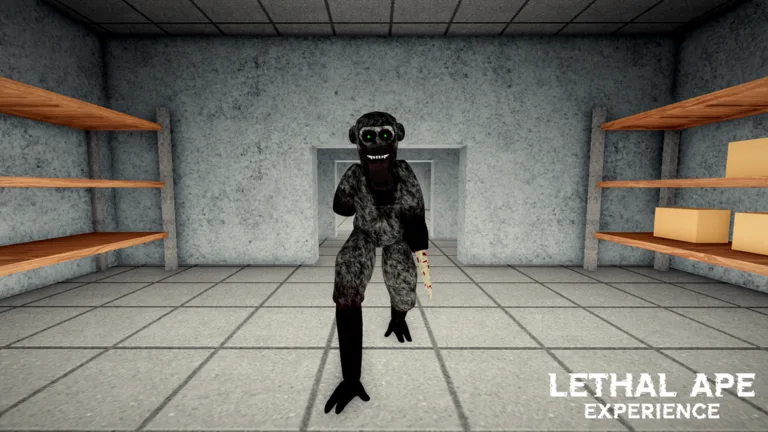
Lethal Ape Experience Wiki: Roblox Survival Guide and Forest Update
Explore the Lethal Ape Experience wiki for Breet Studios' Roblox survival game. Get first-hour tips, Forest Update routes, monster cues, and code status.
Published: Lethal Ape Experience Wiki Editorial Team
Table of Contents
Understanding the Lethal Ape Experience Universe
The Lethal Ape Experience wiki serves as an essential hub for players navigating the public beta version of Breet Studios' atmospheric survival challenge on Roblox. With more than 94 million visits and a 20-player server cap, the game drops participants into a tense environment split between a claustrophobic laboratory and the expansive outdoor threats introduced in the Forest Update.
Tip
Important Distinction: This guide covers Lethal Ape Experience by Breet Studios (Play ID: 117713779364528), which is entirely separate from the older, larger game titled Lethal Ape by gub_dev. Make sure you check official links before diving into community spaces to avoid confusion.
According to community reports and player experiences, surviving this public test requires moving past basic shooter instincts. The gameplay loop demands patience, careful resource management, and acute auditory awareness. Because the project remains in an active public beta state, mechanics, layouts, and shops undergo frequent balancing and adjustments by the development team.
To get started on the right foot, players should familiarize themselves with the core framework of the experience. You can check out the official Lethal Ape Experience Roblox Game Page to join a live session and test your survival skills against other players.
First-Hour Survival Plan for Public Beta
Dropping into a public server without a plan usually results in a quick trip back to the lobby. Community veterans recommend a structured approach during your first hour in the facility to understand how threats operate and how to navigate safely.
Join a Quiet Server: Open the game and look for a server well under the 20-player cap that isn't overwhelmed by lobby noise. Take a moment to check the layout tables before dropping down.
Prioritize Sound Discipline over Speed: Walking should be your default movement mode. Save sprinting exclusively for moments when a hunter has already spotted you and direct escape is necessary.
Lock Down a Safe Loop: Establish a reliable spawn-to-cover route inside the lab. Do not attempt large outdoor loops until you can navigate indoor corridors without panic-sprinting.
Study Hunter Profiles: Stop treating every silhouette the same. Sight, sound, and ambush predators require distinct countermeasures.
Ignore Fake Code Generators: Verify code status through reliable community hubs rather than pasting unverified strings into chat or external generators.
Navigating the Forest Update and Outdoor Routes
The August map drop significantly expanded the scope of gameplay by introducing outdoor environments alongside the core laboratory setting. The Forest Update adds new navigation challenges, forcing players to adapt from tight, predictable indoor corridors to wide-open spaces with distinct lines of sight.
When transitioning from the lab to the forest, players must learn new environmental thresholds. Landmarks serve as vital navigation tools to prevent getting lost in the dense foliage. According to community feedback, audio cues change dramatically outdoors; ambient noises can easily mask the footsteps of approaching forest stalkers.
Successful outdoor runs depend on establishing thresholds back to safety. Always keep a mental note of where the indoor structures begin so you have a fallback option when pursued by aggressive entities. Squad coordination becomes essential here, as splitting roles between scouts and looters helps minimize exposure time in open zones.
Monster Roster and Threat Management
One of the most critical aspects of mastering the experience is understanding the behavior of the entities inhabiting the map. Grouping threats by how they track players rather than relying on rumored names helps build effective counter-strategies.
Lab hunters typically rely on enclosed acoustics, punishing players who make excessive noise in narrow hallways. Conversely, forest stalkers utilize environmental cover and visual camouflage to ambush unsuspecting survivors.
Sound Cues
Metal scraping, sudden rustling, heavy breathing, and abrupt silence all indicate distinct threat proximities. Recognizing these audio signatures gives you enough time to execute a defensive maneuver.
Threat Tiers
Public beta tier lists rank entities based on lethality and unpredictability. Reviewing these rankings helps you decide whether to stand your ground, hide behind cover, or flee immediately.
Code Status and Avoiding Scams
A common point of confusion for newcomers revolves around redeemable promotional codes. As of the current public test phase, there is no confirmed working redeem box or input screen within the experience.
Community tracking warns players against third-party sites and video tutorials claiming to offer exclusive item codes or currency generators. These lists are almost universally fabricated to drive traffic. When Breet Studios officially implements a redemption feature, updates will be reflected directly through their official communication channels and verified community hubs.
Utilizing Scripts, ESP, and Player Tools Safely
Discussions surrounding utility tools, ESP, and auto-farm scripts are common within the community, but players must exercise extreme caution. While certain players look to scripts for tracking loot nodes or hunter locations, doing so carries inherent account risks on the Roblox platform.
Many automated pickup loops break when interacting with newer map elements like Forest nodes. Instead of relying on unauthorized scripts, players achieve better long-term progression by utilizing standard survival checklists and sound-cue sheets. Mastering the game's native mechanics ensures account security while providing a genuinely rewarding survival challenge.
Check lobby conditions and server population before dropping in.
Keep headphones on to identify directional footsteps and audio cues.
Practice crouching and hiding in designated lab cover zones.
Establish clear communication channels if playing with a coordinated squad.
Frequently Asked Questions
Is this game related to Lethal Ape by gub_dev?
No. This experience is developed independently by Breet Studios. The older game by gub_dev is a completely separate Roblox place with different mechanics and progression systems.
Is Lethal Ape Experience finished?
The game is officially classified as a public beta. Expect regular updates, map adjustments, and balancing patches as the developers continue refining the core survival loops.
Can I play this experience solo?
Yes, you can enter public servers alone, though coordinating with other players in a 20-player session often helps with resource gathering and surviving aggressive monster encounters.